

How to Get the Most Out of Running Mode
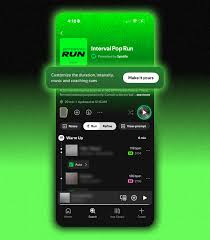
The right soundtrack can help you make the most of every mile. But each run calls for something different: a high-energy push through intervals, familiar favorites to stay in your groove, or new music to keep your regular route feeling fresh.
Now, Spotify’s Running Mode is available to Premium subscribers on Android in select markets, making it easier than ever to create a running mix that matches your goals, mood, and motivation. Whether you’re training for a race, kickstarting your fitness journey, or just looking to move to the music you love, here’s how to build a Running Mode session to fit whatever’s on your agenda.
Open Spotify and head to the Fitness hub to find Running Mode. Start with one of the 25 presets across different workout types and genres. For an uncomplicated way to get out the door, try a quick 20-minute session of Just Run. Looking for more structure? You can choose from workouts like:
Intervals: Alternate harder efforts with recovery periods.
Pyramids: Gradually build in intensity before easing back down.
Easy: Start with a short warm-up, move into a steady run, and finish with a cooldown.
Longer and advanced: Go the distance with more challenging sessions.
Set your session length from 10 to 90 minutes to fit your schedule and energy level.
Within each workout type, you can choose between genres including pop, EDM, country, hip-hop, or something else. And whether you love a well-grooved running playlist or think you’ll go faster with some new-to-you picks, we’ve got you covered. You can stay close to music you already know and love, or shift the discovery setting toward “Mostly new music” to hear fresh tracks along the way.
Want to get even more specific? Tap “View prompt” to edit the request behind your Running Mode playlist. Powered by Prompted Playlist, this feature lets you use your own words to guide Spotify toward the music that feels right for that particular run.
Try refining your prompt with requests like “Bring back songs I used to love but haven’t played this year” or “All songs should be under three minutes.”
The more detail you share, the more your session reflects your personal taste. Your Running Mode playlists update daily, but if you create a mix you love, you can save it to revisit later.
For a more pace-focused experience, turn on Beat Matching to select a target BPM. While 160 BPM is the most popular setting, many runners aim for 170-180 BPM to go for a faster cadence. Running Mode will select music that aligns with your chosen tempo. Turn on “Adjust song speed to match BPM” when you want a consistent rhythmic flow, or leave it off to preserve each track’s original feel.
Running Mode also includes optional English audio cues to offer guidance through structured sessions. Turn on coaching when you want encouragement and an extra boost of motivation, or tap to turn it off to keep the focus on the music.
Either way, the experience is designed to support the routine, instructor, or training plan that works for you.
Ready to find your rhythm? Premium users on iOS and Android in the U.S., Canada, the U.K., Ireland, Australia, New Zealand, and Sweden can find Running Mode in Spotify’s Fitness hub.
( Press Release Image: https://photos.webwire.com/prmedia/6/359128/359128-1.jpg )
WebWireID359128
This news content was configured by WebWire editorial staff. Linking is permitted.
News Release Distribution and Press Release Distribution Services Provided by WebWire.