

Instagram Stickers: Tips and Tricks for Finding the Best Ones
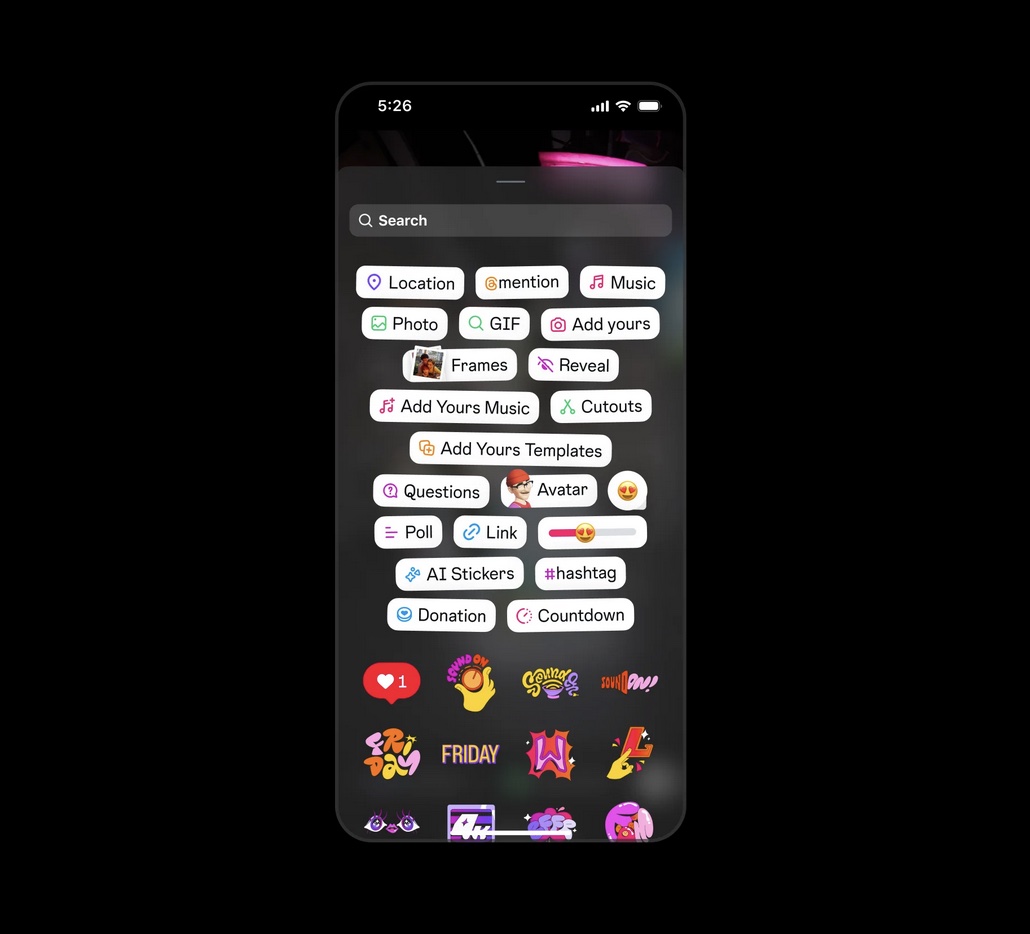
On Instagram, stickers are all about making your Stories, Reels, and Posts more fun, expressive, and interactive. Whether you’re hyping up an event, sharing your mood, or just having fun, there’s a cute sticker for every moment.
Use this guide to understand how to discover cute stickers on Instagram and start customizing your posts and messages to your style.
Types of stickers you can use across Instagram
When creating posts or if you’re reaching out to your friends in DMs, consider using a sticker to add your unique spin. Open the sticker tray and browse through different categories, seasonal collections, music, and popular options. Here are the types of stickers you’ll see across Instagram:
1. Interactive Stickers:
Get your friends and followers in on the fun – create quizzes, ask questions, run polls, and use Add Yours stickers that make your content a two-way street. The Magic Ball sticker offers another interactive element, allowing you to publicly share the answer to a question you pose.
2. Expressive Stickers:
Show off your vibe and mood with emojis, avatars, music, and GIF stickers that move, pop, and bring your personality to life.
3. Utility Stickers:
Add context and style with time, location, and weather stickers that tell your story’s where and when. You can also use the Countdown sticker to get your followers excited about your events.
4. Support Stickers:
Support the causes and brands you love by sharing stickers that help your community shop, donate, and spread the word with just a tap.
5. Music Stickers:
Curate your story’s vibe and highlight your excellent taste by adding your favorite music. You can choose from songs picked just for you, or trending and original audios. You can post the song name, album art, or spinning record to your image or video.
How to search and discover creative stickers
Instagram makes it easy and fun to find the perfect sticker for your story, reel, or conversation. To find the right sticker for you, open the sticker tray when creating a post and type in keywords like “birthday”, “mood”, “food”, “LOL” to find stickers that match your vibe or theme. This search works for both static stickers and GIF stickers, making it easy to find exactly what you want – even rare or trending options!
Make sure to be specific with your search terms for the best results like “basketball” instead of just “sports”. Search for moods, holidays, or trending slang to see what’s new; and remember to layer and combine stickers for unique effects – get creative!
Use GIPHY for more sticker options
When you open the sticker tray, you’ll land on a page with trending or featured stickers curated by Instagram and GIPHY. You can browse by categories, like “Accessories”, “Effects”, “Word Art”, or “Emoji” and GIPHY’s constantly updated library will show you new and creative results. You can also tap on the “GIF” icon to access a huge library of trending GIFs.
Tip: if you’re a brand or a creator, you can upload your own stickers to GIPHY to make them searchable for everyone on Instagram. Engage with your audience further by creating stickers that they can express themselves with.
Customize and design your own aesthetic stickers
You can level up your sticker game by creating your own custom stickers. Just tap the sticker icon when you’re editing, then look for the “Cutouts” or “Your Stickers” option to turn your favorite photos into reusable stickers. Use the built-in tools to crop, refine, and add a personal touch – think selfies, pets, or anything that shows off your vibe. Once you save your custom sticker, it’ll be ready to use again and again, making your content stand out every time.
We’re consistently dropping new stickers on Instagram, so check your sticker tray often to see what’s fresh and trending!
( Press Release Image: https://photos.webwire.com/prmedia/7/350240/350240-1.jpg )
WebWireID350240
This news content was configured by WebWire editorial staff. Linking is permitted.
News Release Distribution and Press Release Distribution Services Provided by WebWire.